
SMPlayer is a fast, lightweight and fully featured multimedia player designed for users who want a smooth playback experience without installing extra codecs. Built on the powerful MPlayer and MPV engines, SMPlayer can play virtually any video or audio format—AVI, MP4, MKV, MPEG, MOV, WMV, MP3, FLAC, AAC and many others—straight out of the box. Whether you’re switching from VLC or searching for a stable, codec-free media player with advanced features, SMPlayer gives you a simple, customizable and highly efficient way to enjoy your media library.
SMPlayer is available for Windows and Linux and is loved for its wide format compatibility, clean interface and minimal CPU usage. You can open large 4K videos, damaged files, or partially downloaded clips without worrying about crashes. This makes it ideal for students, content creators and home users who need a reliable multimedia solution that “just works.”
Privacy-Friendly & Open-Source
Unlike commercial players that collect tracking data or push ads, SMPlayer is completely open-source and privacy-respecting. It does not record your activity, sync your playlists, or monitor what you watch. There are no ads, no intrusive pop-ups and no unnecessary background services.
Because SMPlayer is built on open-source engines, you can review its code, modify behavior or integrate it into your own workflow. This transparency and control make it a trusted choice for users concerned about privacy and unwanted telemetry.
SMPlayer: Universal Format Support – No Codecs Needed
One of the biggest advantages of SMPlayer is its ability to play any media file without external codecs. Everything you need is included with the player.
Key Features:
- Plays all major and uncommon formats (AVI, MKV, MP4, MOV, DIVX, H.264, HEVC, MP3, OGG, FLAC, AAC, etc.)
- Remembers playback settings for each file — position, volume, subtitles, filters
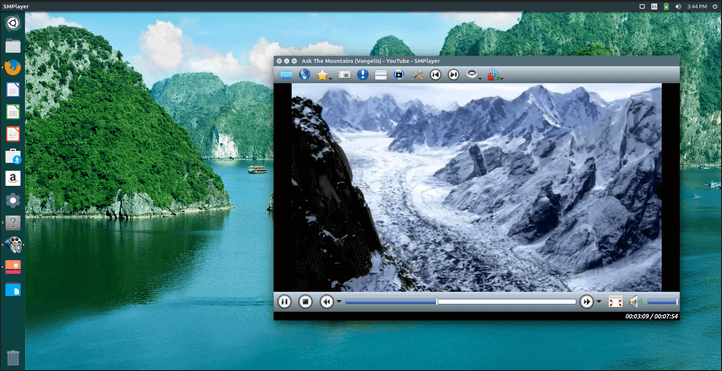
- Built-in YouTube browser to search and play videos directly inside SMPlayer
- Advanced video control (speed, zoom, rotation, deinterlace, filters)
- Fully customizable interface — skins, icons, layout themes, toolbars
- Subtitle support with automatic subtitle download from OpenSubtitles
- Audio equalizer & filters for enhanced sound quality
- Screenshot capture from any video frame
- Hardware acceleration for smooth 4K playback
- Multi-platform support for Windows and Linux
SMPlayer is frequently compared to VLC, and many users prefer it for its performance optimizations and automatic memory settings. It also handles broken and corrupted files better than most media players.
Customization & Productivity Tools
SMPlayer gives users full control of the playback environment:
- Change the interface theme
- Modify toolbar placement
- Add keyboard shortcuts
- Enable mouse gestures
- Save playlists
- Fine-tune audio sync/video sync
- Configure preferred subtitle fonts
- Select codecs and output modules
The built-in YouTube player is also highly appreciated—allowing HD playback without a browser.
SMPlayer – Free Download (Latest Version)
Version: 24.x (generic future-friendly versioning)
A powerful and versatile multimedia player with built-in codecs and full format support.
Download
(Your download button will appear here on microespanatools.com)
Changelog
We don’t yet have official changelog information for the latest SMPlayer version. Developers typically publish update notes shortly after release.
Please check back soon—or if you have update details, feel free to contact us and share the information.
Can You Help?
If you have additional insights, changelog notes or improvements to suggest for SMPlayer, visit our Contact page and reach out. We’d love to keep this page updated with accurate information for the community.